How I created a digital closet using ChatGPT, organized my entire wardrobe, and started wearing clothes I’d completely forgotten about.
Okay, I think I may have found one of my FAVORITE ways to use ChatGPT. And trust me, I’ve used it for a lot of things.
I turned ChatGPT into my own personal stylist. But not just a stylist that tells me what looks good together. I’m talking about a stylist that knows what’s ACTUALLY hanging in my closet.
Every rugby shirt. Every button-up. Every pair of jeans. Every polo. Every sweatshirt.
And when I say every piece, I mean EVERY. SINGLE. PIECE.
I spent time taking pictures of my clothes, having ChatGPT catalog and label them, and building what is essentially a digital version of my closet.
Now, when I need an outfit, I can open ChatGPT and say something like, “I’m going to my daughter’s performance tonight. What should I wear?”
And instead of giving me generic outfit inspiration featuring clothes I don’t own, it can suggest outfits using the actual pieces already sitting in my closet.
IT IS SO COOL!
But here’s what I love most: I’m wearing things I haven’t worn in forever. Clothes I still love but somehow completely forgot about.
After sharing a little of this process on Instagram, SO MANY of you wanted to know exactly how I did it.
So we’re getting into all the details. What I photographed, how I organized everything, what I told ChatGPT, and how you can do the exact same thing.
And yes, it takes some time to set up. But once you do? GAME CHANGER.
What Is a ChatGPT Digital Closet?
Think of it as creating a virtual wardrobe inventory inside ChatGPT.
Instead of standing in front of your closet trying to remember what you own or figuring out what looks good together, you can use ChatGPT to help you put together outfits.
The difference between this and simply asking AI for fashion advice is that you’re giving it information about YOUR actual clothes.
Not clothes from Pinterest.
Not an outfit from some expensive store.
YOUR CLOTHES.
You photograph the items, identify them, organize them into categories, and give each piece a label so you can reference it later.
Then you can ask ChatGPT to help with everything from everyday outfits to special events.
And the best part? You don’t need a fancy closet, an expensive wardrobe, or some elaborate fashion system to get started.
You just need your phone, your clothes, ChatGPT, and a little patience.
Step 1: Start by Taking Pictures of Your Entire Closet
This was the very first thing I did.
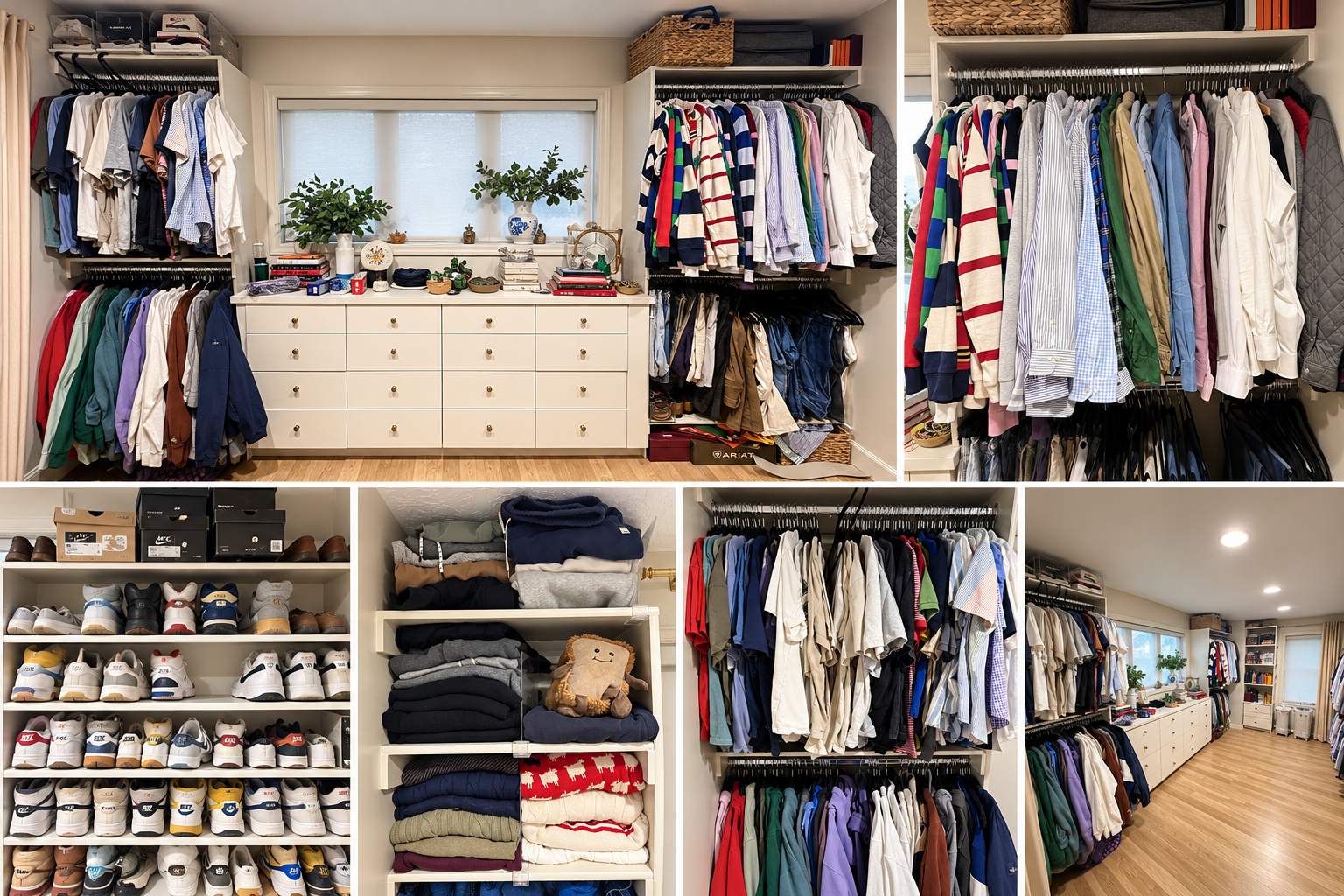
Before photographing individual pieces, I took pictures of my closet as a whole.
I wanted ChatGPT to see how everything was currently organized, where my clothes were hanging, what my drawers looked like, and how much space I had.
I sent several pictures showing the different sections of my closet.
This gave ChatGPT a general understanding of the layout before we started working on individual items.
I also explained what was stored where.
For example, I told it how my drawers were organized, which sections belonged to me, and that I kept my coats in a separate coat closet.
Why does this matter?
Because I didn’t just want help putting outfits together. I also wanted to figure out the best way to organize everything.
And I was completely open to rearranging the closet if there was a better system!
MY TIP: Start with 4–6 wide pictures of your closet. Don’t worry about cleaning everything up or making it look Pinterest-worthy. You want ChatGPT to see what you’re actually working with.
What to Tell ChatGPT First
Here’s a prompt you can copy and paste to get started:
“I want to turn ChatGPT into my personal stylist and create a digital inventory of my entire wardrobe. I’m going to send you pictures of my closet first so you can understand how everything is organized. Then I’ll send individual pictures of my clothing so we can catalog and label every piece. I want you to help me organize my closet and eventually create outfits using ONLY the clothes I actually own. Please help me work through this step by step, keep track of the items, and tell me what pictures you need next.”
That’s it! You don’t need to know all the technical stuff. Just explain what you’re trying to accomplish.
Step 2: Break Your Closet Into Categories
Here’s where I think people could get overwhelmed.
DO NOT try to photograph your entire wardrobe in one giant batch.
Seriously.
Instead, we broke everything down into categories and worked through one section at a time.
For my closet, we worked through categories like:
- Rugby shirts and jerseys
- Long-sleeve patterned button-ups
- Solid-colored button-ups
- White dress shirts
- Suits and sport coats
- Jeans and pants
- Shorts
- Sweatshirts and hoodies
- Short-sleeve button-ups
- Polos
- T-shirts
And I still had other categories to add, including sweaters, cardigans, vests, and more!
This made the process SO much easier.
For example, I had 22 rugby shirts and jerseys. So instead of sending those along with everything else, we focused entirely on that category.
Once those were cataloged, we moved on.
Then we did 19 patterned long-sleeve button-ups.
Then solid-colored button-ups.
Then my eight white long-sleeve shirts.
You get the idea.
MY TIP: Start with the category you wear most often. If you live in jeans and T-shirts, start there. You don’t have to do everything in the same order I did.
Step 3: Take Individual Pictures of Every Clothing Item
This is probably the most important part of the entire process.
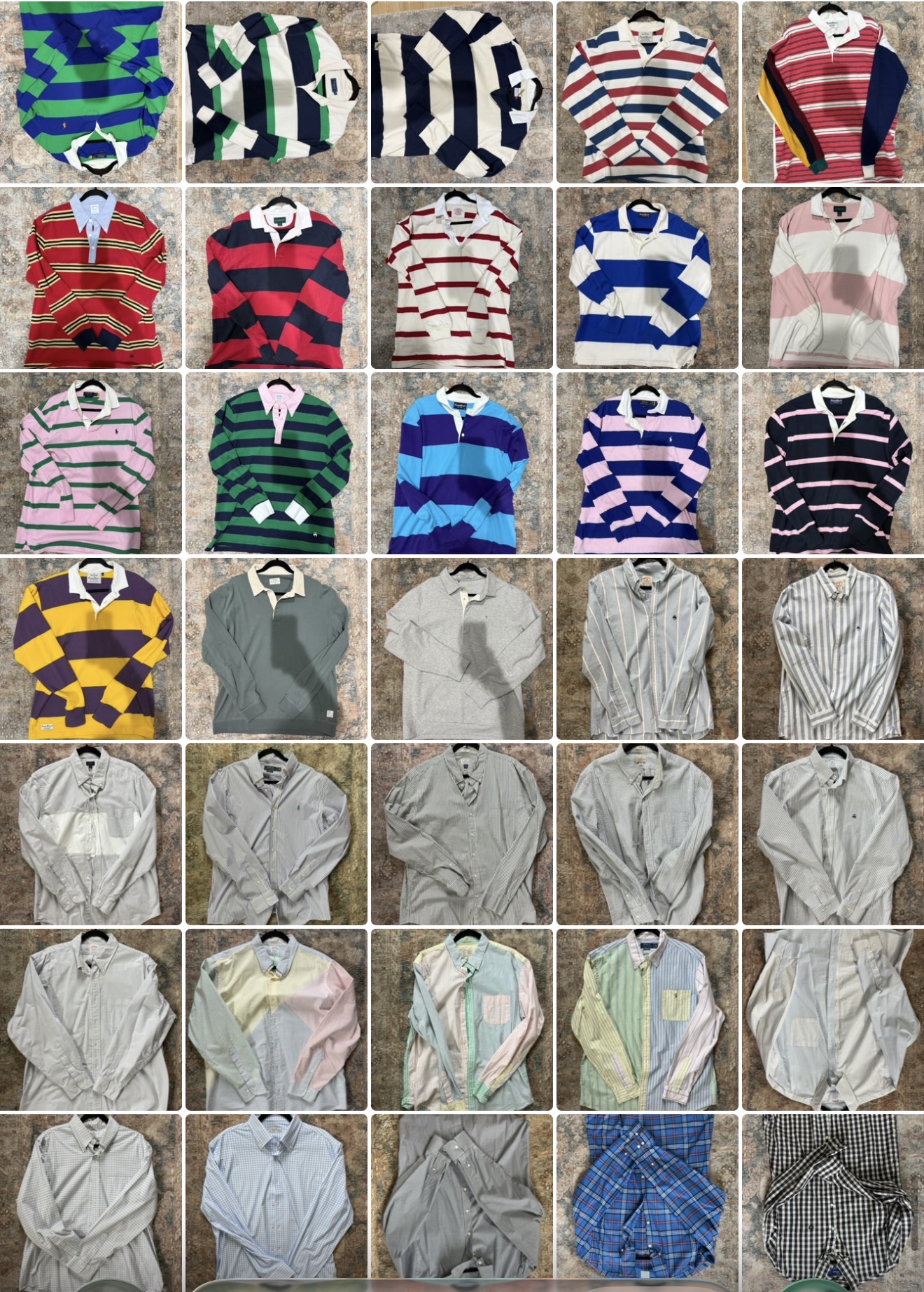
I photographed my clothes individually so ChatGPT could identify what each item looked like.
And when I say individually, I mean I took a picture of one shirt, then the next shirt, then the next.
I wasn’t trying to create some professional clothing photography studio in my bedroom.
I simply wanted clear pictures that showed the color, pattern, style, and overall appearance of each piece.
I sent the photos in manageable groups, often around five or six at a time.
Why smaller groups?
Because it’s much easier to keep track of everything and make sure nothing gets missed.
How to Take the Best Clothing Photos for ChatGPT
Here’s what I recommend:
- Photograph one item at a time. Make sure the entire piece is visible.
- Use good lighting. Natural light is great because it helps show the true color.
- Keep the background simple. You don’t want other clothing distracting from the item.
- Show the details. Patterns, collars, logos, and textures can help distinguish similar items.
- Send small batches. Five or six photos at a time worked well for me.
- Finish one category before starting another. Trust me, you’ll thank yourself later.
If you have multiple shirts that look almost identical, photograph them separately anyway.
I had eight white button-ups, and I wanted ChatGPT to know they weren’t all the same shirt!
Step 4: Have ChatGPT Label and Catalog EVERY Item
This is where the magic really started happening.
As I uploaded pictures, we created a catalog of my wardrobe.
Each item received an identifying label.
For example, we used labels like:
- P1, P2, P3, etc., for pants
- S1, S2, S3, etc., for shorts
- SW1, SW2, SW3, etc., for sweatshirts
The exact letters don’t matter. What matters is that every item has a unique identifier.
That way, when ChatGPT recommends a specific pair of pants, we can identify exactly which pair it’s talking about.
Not just “wear your dark jeans.”
I want to know WHICH dark jeans!
We also documented details such as the brand, color, pattern, and clothing type whenever possible.
And here’s something important: ChatGPT didn’t always get everything right.
There were times it identified a brand incorrectly, and I corrected it.
For example, I had a pair of pants that needed to be corrected to Southern Tide. I also corrected the brand on a couple of white shirts to &Collar.
And that’s completely normal!
AI can make mistakes, especially when logos aren’t visible or pieces look similar.
The important thing is that you’re checking the inventory as you go.
The Prompt to Use for Cataloging Clothes
“I’m going to send you pictures of my [CATEGORY]. Please catalog each item individually and assign it a unique label. Include the color, pattern, brand if identifiable, style, and any other details that would help you recognize it later. Keep the numbering consistent as I send additional batches. If you’re unsure about a brand or detail, ask me instead of guessing. After each batch, show me what you’ve recorded so I can make corrections.”
One more thing I’d recommend: Ask ChatGPT to create a master inventory as you go.
That way, you have a separate record of your clothing instead of relying entirely on a long conversation.
You can keep it in a spreadsheet or document and update it whenever you add or remove clothes.
Step 5: Teach ChatGPT Your Personal Style
Okay, here’s where it gets REALLY fun.
Once ChatGPT has information about your clothes, you can start teaching it what you actually like wearing.
Because just because two things technically match doesn’t mean I’m going to wear them together.
I wanted outfits that felt like ME.
My style leans toward classic, preppy, comfortable, and put-together without looking like I’m trying too hard.
Think rugby shirts, chinos, white sneakers, button-ups, good denim, and the occasional sport coat.
So we started testing outfit ideas.
ChatGPT gave me three looks to try.
One included a rugby shirt with chinos and white sneakers.
Another paired an olive T-shirt with cream shorts.
And another featured a light-blue button-up, dark denim, a navy sport coat, and brown loafers.
And guess what?
I told ChatGPT I’d wear ALL THREE.
That’s important feedback!
Now it has examples of the types of outfits I actually like.
Tell ChatGPT What Works (And What Doesn’t)
Don’t be afraid to say:
- “I love this outfit.”
- “I would never wear those two pieces together.”
- “Can we make this more casual?”
- “I want something a little more preppy.”
- “That feels too dressy for what I’m doing.”
- “Give me something completely different.”
The more useful feedback you provide, the better your future recommendations can become.
It’s like working with a personal stylist who gets to know your preferences over time.
Step 6: Start Asking ChatGPT What to Wear
THIS is the part that makes all the setup worth it.
Now I can tell ChatGPT what I’m doing that day and ask it to put together outfits.
And I’m not just talking about special occasions.
I’ve asked for outfit ideas for school events, speaking engagements, lacrosse games, mahjong events, and regular days when I have a bunch of random things going on.
For example, I had a day where I needed to go to a school program, take my boys to mow a lawn, and then speak at a dinner event.
That’s a pretty random combination of activities!
But instead of trying to figure out what would work for everything, I asked ChatGPT for outfit ideas.
Another time, I needed something to wear to my daughter’s voice lesson performance.
ChatGPT suggested options, and I could ask follow-up questions about which specific pants to wear.
And that’s what makes this different from a normal outfit inspiration app.
I can have an actual conversation about what I’m wearing.
My Favorite ChatGPT Outfit Prompts
Here are some examples you can copy:
For everyday outfits:
“Give me three outfit options for today using only the clothes in my digital closet. I want to look put-together but still casual. Tell me the exact pieces and their inventory labels.”
For a special event:
“I’m attending [EVENT]. Give me three outfit options using clothes I already own. Include the shirt, pants, shoes, and any layers you recommend.”
For something more casual:
“I like that outfit, but can you make it a little more casual without losing my personal style?”
For clothes you haven’t worn:
“Create five outfits featuring pieces from my closet that I haven’t been wearing very often. I want to rediscover some of my clothes instead of always reaching for the same things.”
For one specific piece:
“I want to wear my [ITEM OR INVENTORY LABEL] today. Give me three different ways to style it using the rest of my wardrobe.”
For an entire week:
“Plan seven outfits for this week using my digital closet. Give me a variety of looks and avoid repeating the same pieces too often.”
One thing I always recommend including is: “Use only clothes from my catalog, and tell me the exact inventory labels.”
That keeps the suggestions tied to the wardrobe you’ve actually documented.
If it doesn’t know whether you own something, tell it to ask rather than make an assumption.
Step 7: Use ChatGPT to Rediscover Clothes You Already Own
This might actually be my FAVORITE benefit of the entire thing.
You know how you have certain clothes that you wear over and over again?
Meanwhile, there are perfectly good pieces hanging in your closet that you genuinely love, but for whatever reason, you never reach for them.
THAT’S ME.
I have clothes I love that have been sitting there unworn.
Not because I don’t like them.
Not because they don’t fit my style.
But because I get into a routine of grabbing the same things.
Having a digital closet has helped me see my wardrobe differently.
Instead of looking at a closet full of clothes and thinking, “I have nothing to wear,” I can ask ChatGPT to put together combinations I might not have considered.
Maybe it’s a rugby shirt I haven’t worn in months.
Maybe it’s a button-up that gets overlooked.
Or maybe it’s a pair of pants that works with WAY more things than I realized.
It’s almost like shopping, except you’re shopping your own closet.
And you don’t have to spend a dime!
Try This Prompt to Shop Your Closet
“I want to shop my own closet. Using my wardrobe inventory, create 10 outfits that combine pieces in ways I might not have thought of. Prioritize items I don’t normally wear and avoid relying on the same favorite pieces. Give me the exact inventory labels so I can find everything.”
Now, one clarification: ChatGPT doesn’t automatically know which pieces you’ve worn recently unless you’ve told it or you’ve been tracking your outfits.
So if you really want to focus on neglected pieces, you can identify a few you haven’t worn lately and ask it to build outfits around those.
You can even start keeping a simple outfit log.
How cool would it be to look back and see how much more of your wardrobe you’re actually using?
Step 8: Keep Updating Your Digital Closet
Once you’ve gone through the process of cataloging everything, the hard part is done.
But your wardrobe isn’t going to stay exactly the same forever.
You’ll buy new clothes.
You’ll donate things.
You’ll realize something doesn’t fit anymore.
And that’s okay!
Just keep your digital inventory updated.
When I add a new item, I can take a picture, tell ChatGPT which category it belongs to, and have it assigned the next available label.
If I get rid of something, I can ask ChatGPT to mark it as removed from my active wardrobe.
I recommend keeping the same labels rather than renumbering everything whenever something leaves your closet.
That way, your existing outfit references don’t get confusing.
And periodically, save an updated copy of your master inventory.
IMPORTANT: ChatGPT’s memory and access to old conversations aren’t a perfect substitute for a saved inventory. Depending on the chat, settings, and how much information you’ve added, it may not always have every original photo or detail available.
That’s why I recommend keeping your master inventory in a document or spreadsheet, ideally with the item photos. You can upload or reference that file again whenever needed.
You could even create a dedicated ChatGPT Project for your wardrobe and keep your inventory and styling conversations together.
The goal is to make the system easy to maintain, not to create another chore!
Do You Have to Photograph Every Single Piece of Clothing?
Technically, no.
You could start with 20 or 30 favorite pieces and build from there.
But for me, I wanted the FULL experience.
I wanted ChatGPT to know everything I owned so it could pull from the entire wardrobe.
And I think that’s part of why I’ve enjoyed it so much.
The more complete your inventory is, the more outfit possibilities you can explore.
But please don’t feel like you need to spend an entire weekend photographing everything.
Do one category a day.
Or one section a week.
Start with your pants, then your shirts, then your jackets.
Before you know it, you’ll have a pretty impressive digital closet.
Can ChatGPT Really Be Your Personal Stylist?
I mean, I’m living proof that it can be a pretty useful one!
But I also want to be clear about what it does and doesn’t do.
ChatGPT can suggest color combinations, help you create outfits, identify pieces from photos, and work with your documented wardrobe.
It can also help you figure out what to wear for different occasions and offer alternatives when you don’t love the first suggestion.
But it isn’t perfect.
Sometimes it may confuse two similar pieces, suggest something you don’t own, or recommend a combination you don’t love.
And it can’t know exactly how something fits or feels on your body unless you tell it.
That’s why I think of it as a collaborative process.
ChatGPT makes suggestions.
I decide what I actually want to wear.
And when I give feedback, it helps shape the next set of recommendations.
My Biggest Tips Before You Start Your Own ChatGPT Closet
If you’re thinking about doing this, here’s what I’d tell you:
1. Don’t overcomplicate it. You don’t need professional photos or fancy equipment. Just start.
2. Work in categories. Trying to do everything at once is a recipe for confusion.
3. Label everything. Unique inventory numbers make the whole system easier to use.
4. Correct mistakes immediately. If ChatGPT identifies something incorrectly, fix it before moving on.
5. Save your inventory. Don’t rely solely on one giant conversation to hold every detail forever.
6. Give honest feedback. If you wouldn’t wear an outfit, SAY SO!
7. Have fun with it. Ask for different styles, unusual combinations, and outfits built around neglected pieces.
And remember, the goal isn’t to let AI completely take over your wardrobe.
It’s to make getting dressed easier and help you appreciate the clothes you already own.
Frequently Asked Questions About Creating a ChatGPT Digital Closet
Is ChatGPT free to use for a digital closet?
ChatGPT has a free plan, but photo uploads, usage limits, and available features can vary by plan. Check your current account features before starting a large photo-cataloging project.
Do I need a special digital closet app?
No! I built my system using ChatGPT. You can also keep a separate spreadsheet or document as a backup of your clothing inventory.
How many clothing photos should I upload at once?
I found that sending around five or six pictures at a time made it easier to catalog everything accurately. The ideal batch size can depend on your account’s upload limits and the complexity of your photos.
Will ChatGPT remember all my clothes forever?
Not necessarily. ChatGPT’s memory isn’t designed to be a guaranteed, complete database of every clothing item and photo you’ve ever uploaded. Keep a master inventory and make it available in the conversation or Project you’re using.
Can ChatGPT suggest outfits from my actual wardrobe?
Yes! When it has access to an accurate clothing inventory, it can recommend combinations based on the items you’ve documented. Ask it to include your unique inventory labels so you can find the exact pieces.
Can I use this to organize my closet too?
Absolutely. You can share photos of your closet layout and explain your storage needs, then ask ChatGPT for ideas on organizing your clothes by type, frequency of use, season, or whatever makes sense for you.
Does this work for women’s wardrobes too?
Of course! This isn’t just for dads or men’s clothing. You can use the same process for dresses, skirts, jeans, blouses, accessories, shoes, or any wardrobe.
Final Thoughts: I Might Never Look at My Closet the Same Way Again
Here’s what I love about this whole experience.
I already owned the clothes.
I already had pieces I loved.
I just wasn’t making the most of them.
And now, instead of staring at my closet wondering what to wear, I have a tool that helps me get creative with what I already own.
It makes getting dressed more fun.
It helps me rediscover clothes I haven’t worn in ages.
And honestly, it’s made me appreciate my wardrobe even more.
Is it a little extra to photograph and catalog every piece of clothing you own?
ABSOLUTELY. 😂
But would I do it again?
100%.
And if you’re anything like me and love finding ways to make everyday life a little easier, this is definitely something worth trying.
Now I want to know: Are you going to try creating your own ChatGPT digital closet?
And if you do, PLEASE tag me on Instagram @the_modern_dad because I want to see how yours turns out!
I also want to know what other things you’d like to see me do with my digital closet. More outfit ideas? How I organize everything? A week of ChatGPT picking my clothes?
Because I’m just getting started with this!

